Send recognition, attach rewards, browse the feed, and stay connected to your team’s wins — all from inside the Teams workspace your organisation already runs in. Microsoft single sign-on, real-time sync with the web and mobile platforms, and the same governance the rest of your Teams apps already meet.
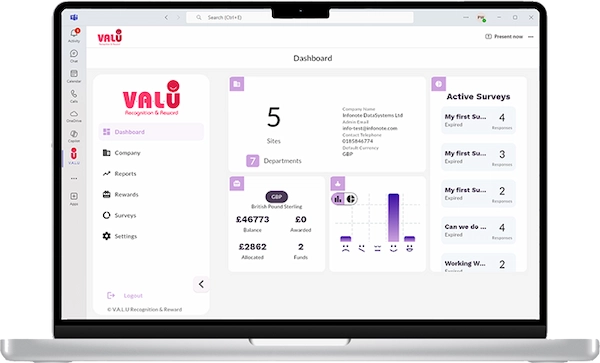
Most “Teams recognition” offerings are notification bots that ping a channel when something happens elsewhere. VALU is a full app inside Teams — not a redirect to a separate tool.
Browse the recognition feed, send peer recognitions, attach rewards, react to colleagues’ wins, and engage with announcements — all from inside Teams. No links out to a web app for the core workflow.
Users authenticate with the same Microsoft account they already use for Teams. No separate VALU password to create or store, no extra user directory to maintain on the HR side. Compliant with Microsoft enterprise security standards.
A recognition sent in Teams shows up instantly on VALU’s web platform, the mobile apps, and the Kiosk display board — and vice versa. The Teams integration is one surface onto the same underlying VALU platform, not a separate copy of the data.
A fully-featured recognition app built specifically for Microsoft Teams. Unlike basic recognition bots, V.A.L.U delivers enterprise-grade functionality without switching between applications—everything you need in one place.
Single Sign-On with your Microsoft account. No separate login required—just open Teams and start recognising.
Our employee recognition app syncs instantly across Teams and the web platform. Send a recognition in Teams, see it everywhere immediately.
The best Microsoft Teams recognition apps integrate seamlessly into your existing workflow while delivering measurable engagement results. When evaluating recognition apps for Teams, HR leaders should look for:
Full SSO integration means no additional user tables to maintain, and no further login credentials for users to create, store or remember. Compliant with Microsoft security standards, your data stays protected within your existing infrastructure.
Real-time updates across Teams and web platforms.
Purpose-built for organisations with 150+ employees.
Track recognition trends and engagement metrics.
Align recognition with your company values and culture.
V.A.L.U checks every box, delivering a comprehensive recognition solution within the Teams environment your employees already use daily.
Add the V.A.L.U recognition app to your Microsoft Teams from the Teams app store.
Use your Microsoft account to sign in automatically with SSO.
Send recognitions and rewards directly from Teams without switching apps.
Receive notifications and stay updated on all peer recognition activity across your organisation.
If your culture already lives in Teams — daily standups, team channels, project chats — recognition belongs in Teams too. Asking employees to leave Teams to recognise a colleague is the friction that kills recognition programmes.
Distributed teams lose the in-person moments where recognition naturally happens. Bringing the recognition feed into the channels where remote colleagues already collaborate gives the same cultural visibility a physical office does.
Field service, healthcare, retail and logistics teams running Teams on shared devices or personal phones get the same recognition experience as office workers — without learning a separate VALU app.
For IT and security teams evaluating people platforms, SSO with Microsoft, deployment through the Teams admin centre, and adherence to Microsoft’s app security standards make VALU a defensible choice on governance, not just on HR value.
A full app. VALU runs as a native Microsoft Teams app, not a bot that posts notifications. Users can browse the recognition feed, send recognitions and rewards, and stay connected to peer activity from inside Teams — no need to switch to a separate web app or mobile app for the core experience.
No. The Teams app uses Microsoft single sign-on, so users sign in with the same Microsoft account they already use for Teams. No separate VALU credentials to create, manage or reset.
Yes, in real time. A recognition sent inside Teams shows up instantly on the web platform, the mobile apps and the Kiosk display board, and vice versa. The Teams integration is one surface onto the same underlying VALU platform, not a separate copy of the data.
They use VALU on the web, on iOS or Android, or via the Kiosk display board. The Teams integration is an additional surface for organisations whose workflow lives in Teams — it doesn’t exclude employees who work elsewhere.
Standard Microsoft Teams app permissions plus directory access for SSO. VALU does not require admin access to mailboxes or files. The integration is built to Microsoft’s enterprise security standards and can be deployed through the Teams admin centre.
Yes. Like any Teams app, VALU can be deployed organisation-wide or through targeted app setup policies in the Teams admin centre. Useful for pilots and phased rollouts.
See how VALU’s native Microsoft Teams app turns the workspace your organisation runs in into the place where recognition actually happens.
Schedule a Demo